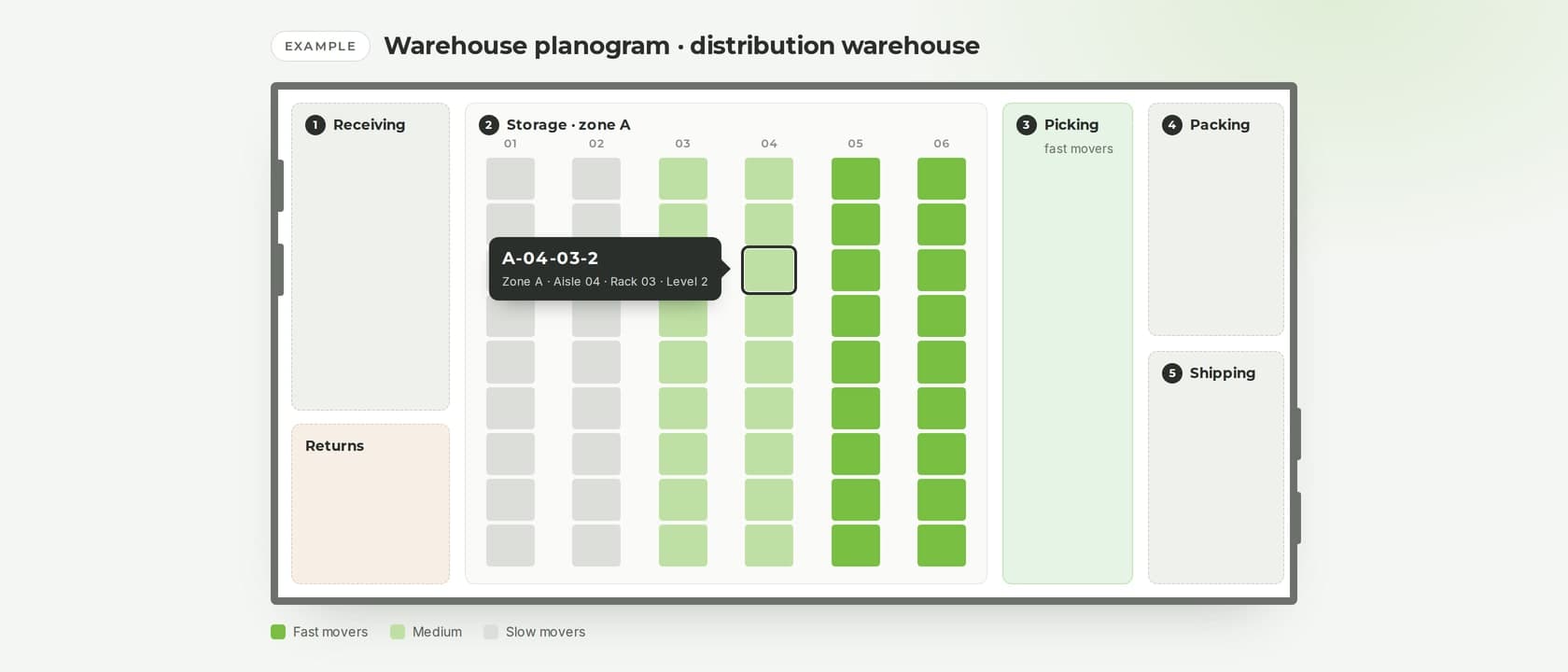
A warehouse planogram is a map of your warehouse that shows where every product lives: which zone, aisle, rack, level and bin. Retail uses planograms to plan a shelf for shoppers; a warehouse uses one to plan locations for the people who receive, store and pick.
This guide explains what goes into a warehouse planogram, how to build one step by step, and how to keep it accurate once the warehouse starts moving.
What is a warehouse planogram?
A warehouse planogram combines three things:
- the layout: zones, aisles and racks, drawn to scale;
- the location map: an address for every place stock can sit, from a pallet position to a small bin;
- the slotting rules: which products go where, and why.
The term comes from retail. In warehouses the same idea also goes by warehouse layout map, location map or slotting plan.
| Retail planogram | Warehouse planogram | |
|---|---|---|
| Who reads it | Shoppers and store staff | Receivers, pickers and forklift drivers |
| What it optimizes | Sales per metre of shelf | Travel time, space and picking accuracy |
| What it covers | One shelf or display | The whole building: zones, aisles, racks, bins |
| When it changes | When the assortment or the season changes | When volumes, products or seasons change |
Why map your warehouse
- Pickers walk less. Fast movers sit close to packing and shipping, so the most frequent trips are the shortest.
- New staff find stock on their first day. They read an address instead of asking the colleague who has worked there longest.
- Putaway goes into free space. Deliveries go to a planned location, not wherever there is a gap.
- Counts point at a shelf. A discrepancy is traced to one location instead of to the whole building.
- You see capacity before you run out of it. Full zones show up on the map before they show up in the aisles.
What goes into a warehouse planogram
Zones
Split the building by activity: receiving, storage, picking, packing, shipping, and a separate area for returns and damaged goods. Add zones for anything with special rules, such as cold storage or hazardous goods.
Location addresses
Give every location an address that follows one scheme across the whole building. A common one is zone, aisle, rack, level, position:
A-04-03-2 = zone A, aisle 04, rack 03, level 2
A few rules keep addresses readable for years:
- keep every part the same length (04, not 4), so codes sort correctly;
- count levels from the floor up;
- number racks in walking order, with odd numbers on one side of the aisle and even on the other;
- put a barcode label with the address on every location.
Location types and capacity
Record what each location can hold: a pallet, a shelf, a bin or a floor area, with its dimensions and maximum weight. Capacity is what lets you plan putaway instead of discovering that a pallet does not fit.
Slotting rules
Decide which products go where. The usual criteria are how often a product is picked, its size and weight, how it is ordered (products often ordered together can sit close to each other), and its storage needs, such as temperature or a hazard class.
How to create a warehouse planogram, step by step
- Measure the building and draw it to scale: walls, doors, docks, columns and racks.
- Mark the flow of goods: receiving, storage, picking, packing, shipping. Avoid paths that cross, and make aisles one-way where traffic is heavy.
- Define the zones by activity and by storage needs.
- Choose an addressing scheme and apply it to every location, with no exceptions.
- Label every location with its address and a barcode.
- Slot the products. Rank them by how often they are picked: the fastest movers go closest to packing and shipping, at waist height; heavy items go on the lowest levels; easily confused items, such as sizes of the same product, go apart rather than side by side.
- Record the map in your warehouse system: locations, types, capacities, and what each one holds.
- Review it regularly. Re-slot when the ranking of fast movers changes, typically every quarter and before the peak season.
An example: a small distribution warehouse
The picture at the top of this article shows a simplified warehouse planogram. Goods arrive at receiving on the left, go into storage, are picked in a zone of fast movers next to packing, and leave from the shipping docks on the right. In storage, the racks closest to picking hold the fast movers and the farthest hold the slow ones. One location is called out: A-04-03-2 is zone A, aisle 04, rack 03, level 2.
Common mistakes
- Addresses only one person understands. If a code needs explaining, it will be misread under pressure.
- Renumbering after go-live. Every label, every report and every habit has to change with it.
- Slotting once and never again. Last year's fast movers are not this year's.
- No place for returns and damaged goods. They end up mixed with saleable stock.
- A map that lives only on paper. If the system does not know the map, the map is out of date within a week.
Keep the map alive with a WMS
A planogram on paper starts going out of date the first time someone puts a pallet in the wrong place. In Planograma WMS the map is part of how the warehouse works:
- you map the warehouse once, with its zones, racks, shelves and bins, and every location has an address;
- staff find stock by reading the location off the handheld;
- when a delivery arrives, Planograma names the location it should go to, out of the space that is actually free;
- a minimum and a top-up quantity per product and per location turn into replenishment pick lists;
- counts are recorded against locations, so a discrepancy points at a shelf;
- every location holds its own stock, and every site is visible in one place.
See how it works for the warehouse and for the stockroom behind a shop floor.
Frequently asked questions
What is the difference between a warehouse layout and a warehouse planogram?
The layout is the physical arrangement of zones, aisles and racks. The planogram adds the address of every location and what is stored in each one.
How do you number warehouse locations?
Use one scheme everywhere, usually zone, aisle, rack, level and position, with each part the same length and levels counted from the floor up. Put the address on a barcode label at every location.
What is slotting?
Slotting is deciding which product goes in which location, usually by how often it is picked, its size and weight, and its storage needs.
How often should you re-slot a warehouse?
Whenever the ranking of your fast movers changes noticeably. For most warehouses that means a review every quarter and one before the peak season.
Want to see your own warehouse mapped in Planograma? Book a demo.
Want to see what Planograma could do for your warehouse?
Book a 30-minute walkthrough with a specialist and see the platform running on your own flows.
Book a demo